Every developer who uses Claude Code hits the same wall eventually. You craft a perfect prompt — maybe it's a code review checklist, a migration workflow, or a deployment script — and it works beautifully. Then the session ends. Next time you need it, you're rewriting from scratch or digging through conversation history hoping to find it.
Agent Skills fix this. They're reusable markdown files that package your best prompts, workflows, and domain knowledge into slash commands that Claude can invoke on demand. Write it once as a SKILL.md file, and it's available every time — across sessions, across projects, even across your entire team.
TL;DR: Agent Skills are markdown files (
SKILL.md) that turn reusable prompts into slash commands in Claude Code. They use a three-tier loading system that keeps context costs near zero until invoked. Store them in.claude/skills/(project-shared) or~/.claude/skills/(personal), and Claude can trigger them automatically or you invoke them manually with/skill-name.
What Are Agent Skills and Why Do They Matter?
Developers using AI coding assistants repeat the same patterns constantly — the same review criteria, the same migration steps, the same testing workflows. Without a reuse mechanism, every session starts from zero. It's the equivalent of writing functions but never saving them to a file.
Agent Skills are Claude Code's answer to prompt reuse. Think of them as functions for AI workflows. A skill is a directory containing a SKILL.md file (with YAML frontmatter and markdown instructions) plus optional reference files, scripts, and templates. Claude loads them on demand, executes the instructions, and produces results — without you re-explaining the workflow every time.
Here's why this matters practically. Suppose you've built a thorough code review process: check for security vulnerabilities, verify error handling, validate naming conventions, and flag performance issues. Without skills, you'd paste that checklist into every session. With a skill, you type /review and Claude runs your full process automatically.
The architecture is worth understanding. Skills use a three-tier loading model that keeps them efficient:
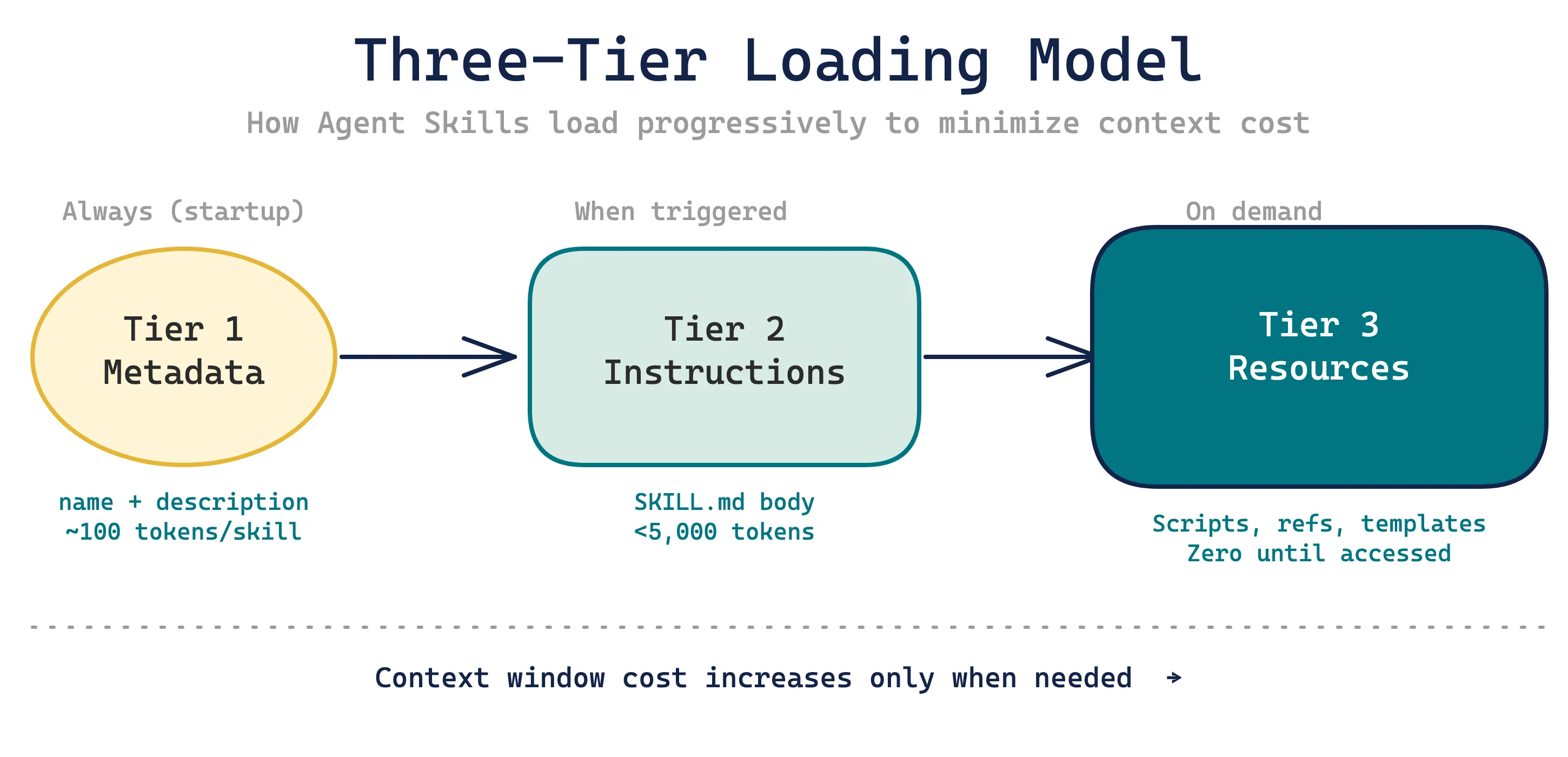
| Level | What Loads | When | Token Cost |
|---|---|---|---|
| Tier 1: Metadata | Name + description only | Always (startup) | ~100 tokens/skill |
| Tier 2: Instructions | Full SKILL.md body | When triggered | Varies (aim for <5,000 tokens) |
| Tier 3: Resources | Scripts, reference files, templates | When Claude reads them | Zero until accessed |
This progressive disclosure means you can have dozens of skills installed without bloating your context window. Only the tiny metadata footprint exists until a skill is actually needed.
Skills vs CLAUDE.md — When to Use Which?
If you're familiar with CLAUDE.md project instructions, you might wonder where skills fit in. They're complementary, not competing:
| Aspect | CLAUDE.md | Agent Skills |
|---|---|---|
| Loading | Always in context | On-demand only |
| Scope | Project-wide conventions | Specific task or workflow |
| Structure | Single file | Directory with multiple files |
| Invocation | Implicit (always applies) | Manual (/skill-name) or auto-triggered |
| Best for | "Always follow these rules" | "Do this specific workflow when asked" |
Use CLAUDE.md for project conventions that should always apply — coding standards, architecture decisions, team rules. Use skills for specific workflows you want to invoke on demand.
How Does a SKILL.md File Actually Work?
Every skill needs one file: SKILL.md. It has two parts — YAML frontmatter that controls behavior, and a markdown body that contains the actual instructions.
Here's a complete example:
---
name: component-gen
description: Generate React components following project conventions.
  Use when the user asks to create a new component or scaffold UI.
allowed-tools: Read, Write, Glob, Grep
---
# Component Generator
## Steps
1. Read `src/components/` to understand existing patterns
2. Check `CLAUDE.md` for component conventions
3. Generate the component with:
- TypeScript strict mode
- Props interface with readonly fields
- Tailwind CSS for styling
- Proper accessibility attributes
## File naming
- PascalCase: `UserProfile.tsx`
- Co-locate tests: `UserProfile.test.tsx`
- Export from barrel: update `index.ts`The frontmatter fields control everything about how Claude discovers and runs the skill:
| Field | What It Does | Example |
|---|---|---|
name | Creates the /slash-command | component-gen → /component-gen |
description | Triggers auto-invocation when matching | Include "when to use" scenarios |
allowed-tools | Pre-approves tools without asking | Read, Write, Bash(npm *) |
disable-model-invocation | Blocks Claude from auto-triggering | true for destructive workflows |
user-invocable | Hides from slash menu | false for background knowledge |
model | Forces a specific Claude model | claude-opus-4-1 |
context | Runs in isolated subagent | fork for independent research |
argument-hint | Shows autocomplete hint | [filename] [format] |
A few things that aren't obvious from the docs. The name field must match the parent directory name — a skill in .claude/skills/review/SKILL.md needs name: review. The description field is the most important for auto-invocation: Claude reads descriptions at startup and uses them to decide when to trigger skills contextually. Write it in third person ("Generate components..." not "I help generate...") and include concrete trigger scenarios.
Where Do Skills Live?
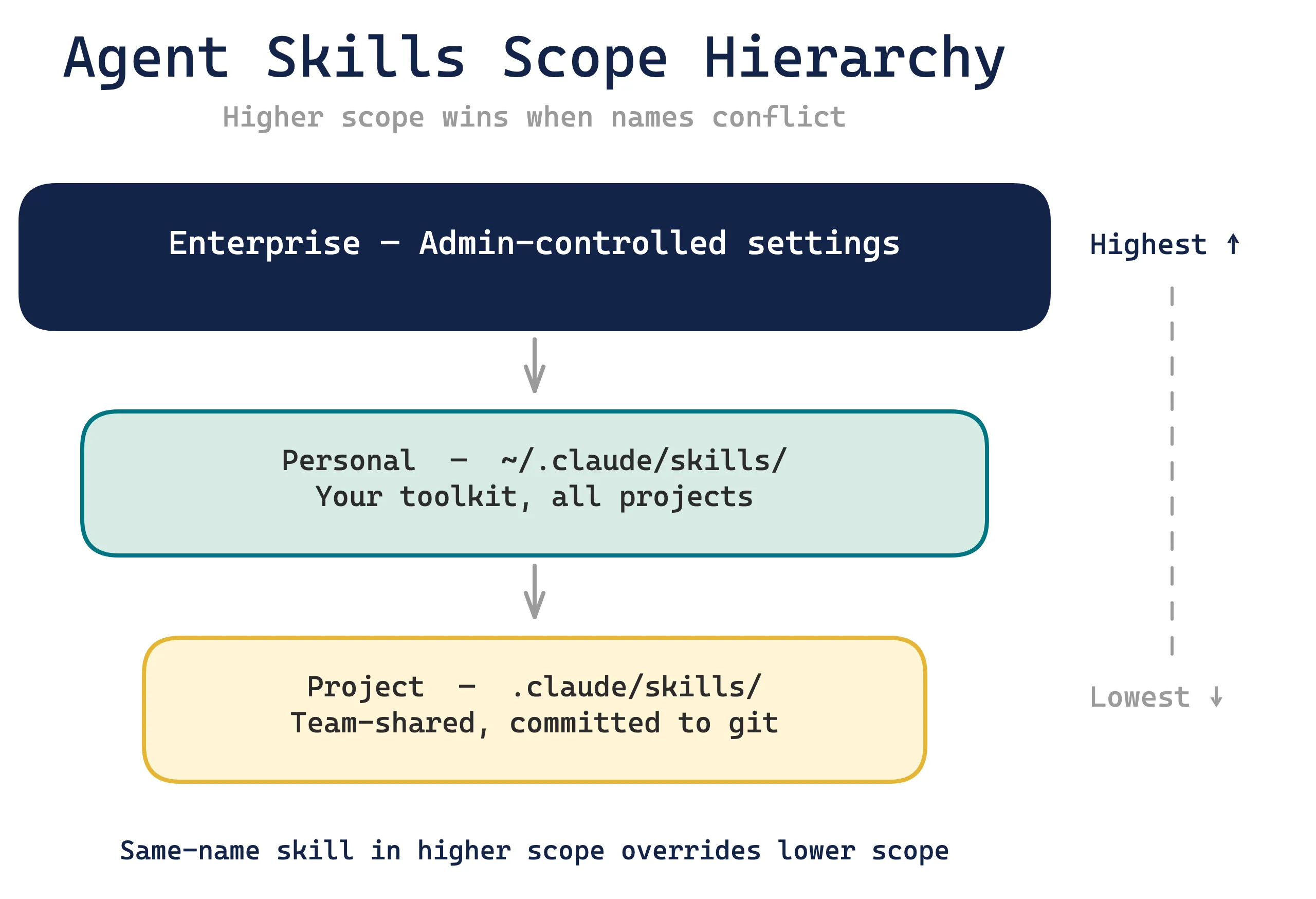
Skills have two storage scopes, and understanding the hierarchy matters for team workflows.
Project scope — shared with your team
your-repo/
└── .claude/
    └── skills/
        ├── review/
        │   └── SKILL.md
        ├── deploy/
        │   ├── SKILL.md
        │   └── checklist.md
        └── migrate/
            ├── SKILL.md
            └── scripts/
                └── validate.py
Project skills live in .claude/skills/ at the repository root. They get committed to git and shared with every team member. When someone clones the repo and runs Claude Code, they automatically get all project skills. This is the primary way teams standardize AI workflows.
Personal scope — your own toolkit
~/.claude/
└── skills/
    ├── my-review/
    │   └── SKILL.md
    └── quick-fix/
        └── SKILL.md
Personal skills live in ~/.claude/skills/ and work across every project on your machine. Use these for personal preferences and workflows that aren't project-specific.
Scope precedence (higher wins): Enterprise > Personal > Project. If you have a personal skill and a project skill with the same name, the personal one takes priority.
Where to Find Community Skills: The skills.sh Marketplace
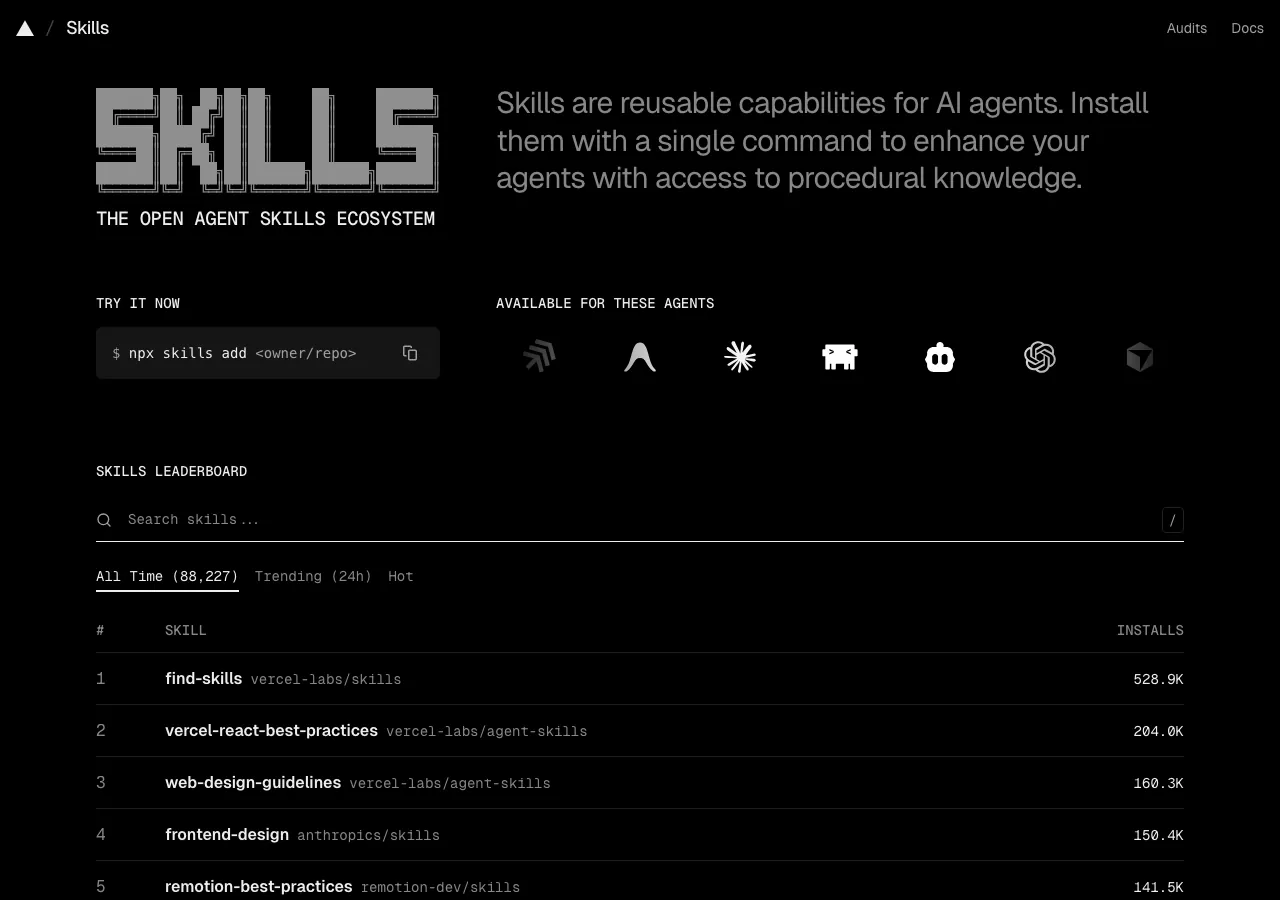
Writing every skill from scratch isn't the only option. skills.sh is an open marketplace — built by Vercel — where developers publish and share skills for Claude Code, GitHub Copilot, Cursor, and 20+ other AI agent platforms. With 300+ listed skills and millions of installs tracked, it's the fastest way to pick up proven workflows without starting from a blank SKILL.md.
Installing a skill takes one command:
npx skills add <owner/repo>Trusted publishers to start with. The highest-quality skills come from publishers with a public track record. Anthropic maintains the anthropics/skills repository — home to skill-creator (covered below) and frontend-design. Vercel Labs publishes a large collection of React and framework-specific skills. Microsoft contributes Azure-focused tooling. These three publishers collectively account for the majority of installs on the platform and have independently audited skill sets.
Check the security audit before installing anything unfamiliar. skills.sh runs each skill through three independent security partners — Gen Agent Trust Hub, Socket, and Snyk — scanning for suspicious shell commands, credential exfiltration patterns, prompt injection surfaces, and supply chain risks. Before installing a skill from an unknown publisher, check its report at skills.sh/audits. Skills execute in your terminal with full tool access; a malicious skill has the same reach as a malicious shell script. Treat the audit rating as a hard gate — if anything shows above Low risk, skip it and find an alternative from a publisher you trust.
How Do You Invoke Skills?
Two paths: you call them explicitly, or Claude calls them automatically.
Manual invocation with slash commands
Type / followed by the skill name:
/review
/deploy staging
/migrate UserService React Vue
Arguments are accessible in the skill body through substitution variables:
---
name: migrate
description: Migrate a component between frameworks.
argument-hint: [component] [from] [to]
---

Migrate the `$0` component from $1 to $2.

$ARGUMENTS contains the full argument string.
$0 is the first argument, $1 is the second, and so on.
Running /migrate SearchBar React Vue would substitute $0 → SearchBar, $1 → React, $2 → Vue.
Automatic invocation — Claude decides
This is where skills get powerful. Claude reads all skill descriptions at startup. When a task matches a description, Claude invokes the skill without you asking. If you have a skill with the description "Generate React components following project conventions. Use when the user asks to create a new component," then saying "create a UserProfile component" triggers it automatically.
Controlling invocation behavior
Two frontmatter fields give you fine-grained control:
disable-model-invocation: true — Only you can trigger it via /skill-name. Claude won't auto-invoke. Use this for skills with side effects: deployments, database migrations, anything destructive.
user-invocable: false — Only Claude can trigger it (no slash command available). Use this for background knowledge skills that provide context without being directly invoked — like a skill that explains your legacy auth system architecture so Claude references it when working on auth code.
Building Your First Skill: A Step-by-Step Walkthrough
Let's build a practical skill from scratch — a PR description generator that reads your git changes and writes a structured pull request summary.
Step 1: Create the directory
mkdir -p .claude/skills/pr-descriptionStep 2: Write the SKILL.md
---
name: pr-description
description: Generate a pull request description from current
  git changes. Use when the user wants to create a PR, write
  a PR summary, or describe their changes.
allowed-tools: Bash(git *)
---

# PR Description Generator

## Process
1. Run `git diff main...HEAD --stat` to see changed files
2. Run `git log main..HEAD --oneline` to see commit history
3. Read the most significant changed files to understand the work

## Output format
Write a PR description with:

### Summary
2-3 bullet points explaining what changed and why.

### Changes
Group changes by category:
- **New features** — what was added
- **Bug fixes** — what was broken and how it's fixed
- **Refactoring** — what was restructured and why

### Test plan
Suggest specific testing steps based on the actual changes.

## Rules
- Focus on the "why" not the "what" — the diff shows what changed
- If commits have good messages, incorporate their intent
- Flag any files that look risky (migrations, config changes, auth)
Step 3: Test it
Open Claude Code in your repo and type /pr-description. Claude reads your git changes and generates a structured PR summary. Iterate on the instructions until the output matches what you want.
Step 4: Add reference files (optional)
If your skill grows complex, split it into multiple files:
pr-description/
├── SKILL.md          # Main instructions (stays concise)
├── templates.md      # PR templates for different change types
└── examples.md       # Examples of good vs bad PR descriptions
Reference them from SKILL.md:
For PR template options, see [templates.md](templates.md).
For examples of good descriptions, see [examples.md](examples.md).
Claude reads these only when needed — they don't load into context until referenced. This is progressive disclosure in action.
Shortcut: let skill-creator write your SKILL.md. Anthropic ships an official meta-skill —
skill-creator— that handles the entire authoring process for you. Install it from skills.sh, invoke it with/skill-creator, and it interviews you about what the skill should do, writes theSKILL.md, runs A/B evals comparing skill vs. no-skill performance, and iterates on thedescriptionfield for better auto-triggering accuracy. Instead of guessing whether your instructions work, you get actual benchmark data. If you're planning to build more than one or two skills, this is worth installing first — it's one of the highest-leverage tools in the Claude Code ecosystem.
What Advanced Patterns Save the Most Time?
Once you're comfortable with basic skills, these patterns unlock serious productivity gains.
Dynamic context injection
Skills can run shell commands before Claude sees the content. Use the !command`` syntax:
---
name: pr-review
description: Review the current pull request.
context: fork
agent: Explore
---

## Current PR context
- Changed files: !`git diff main...HEAD --name-only`
- Recent commits: !`git log main..HEAD --oneline`

## Review instructions
Analyze the changes above for...
The commands execute during skill loading. Their output replaces the placeholder text. Claude sees the results, not the commands. This is preprocessing — it happens before Claude starts reasoning.
Running skills in subagents
Add context: fork to run a skill in an isolated subagent. The subagent doesn't see your conversation history — it gets a clean context with just the skill instructions. Pair it with agent: Explore for read-only research or agent: Plan for architectural planning.
Why does this matter? It protects your main conversation from context bloat. A research skill might read 50 files — you don't want all that in your working context.
Progressive disclosure for large skills
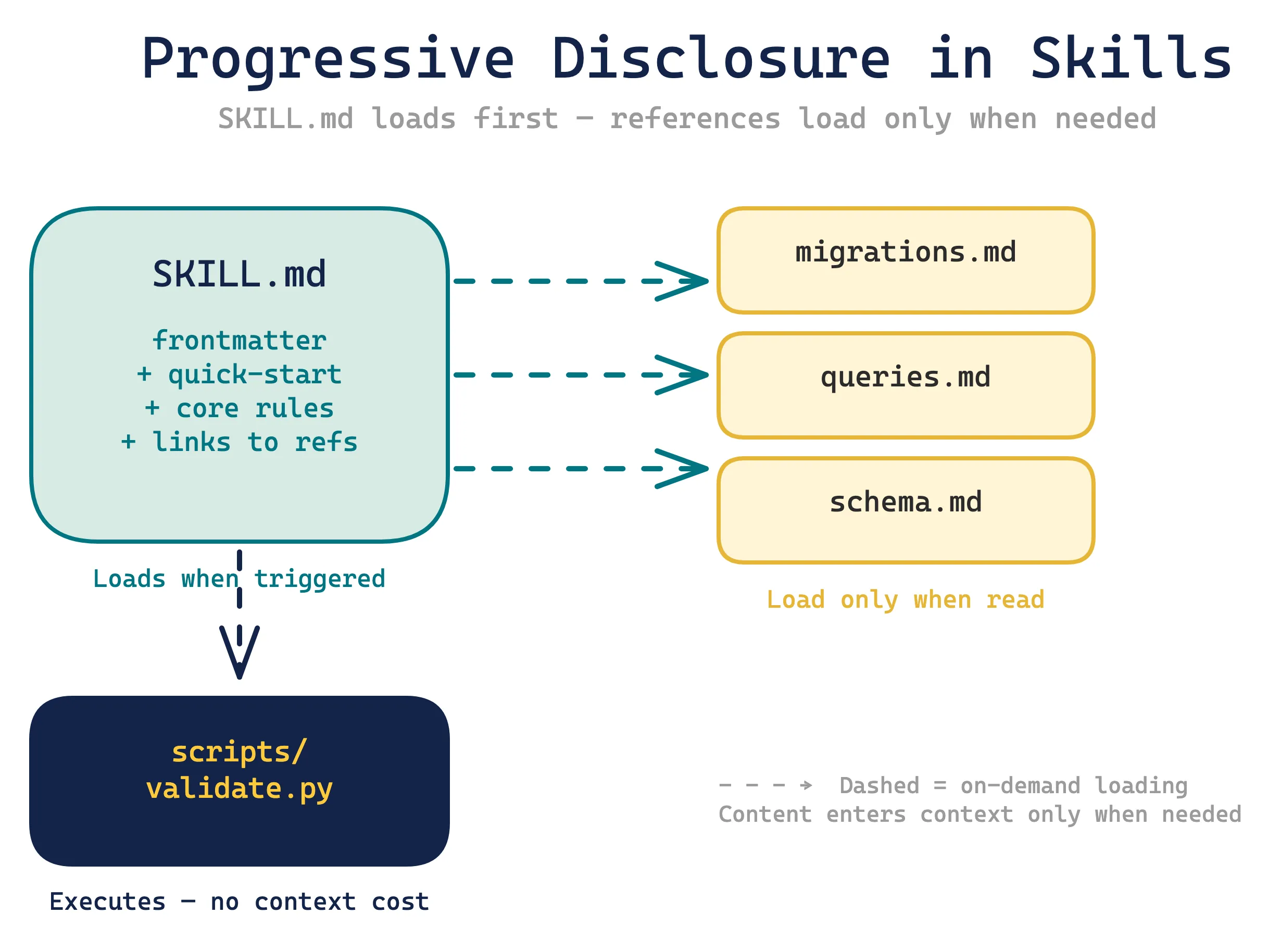
For complex domains, organize skills with a thin main file that points to detailed references:
database-ops/
├── SKILL.md              # Quick-start (50-100 lines)
├── reference/
│   ├── migrations.md     # Migration patterns and gotchas
│   ├── queries.md        # Query optimization rules
│   └── schema.md         # Schema conventions
└── scripts/
    ├── validate_migration.py
    └── check_indexes.sql
The SKILL.md stays concise:
---
name: database-ops
description: Database operations — migrations, queries, schema
  changes. Use when working with the database layer.
allowed-tools: Read, Bash(psql *), Bash(python *)
---

# Database Operations

## Quick reference
- Migrations: see [reference/migrations.md](reference/migrations.md)
- Query patterns: see [reference/queries.md](reference/queries.md)
- Schema rules: see [reference/schema.md](reference/schema.md)

## Core rules (always apply)
1. Never modify production data without a backup step
2. All migrations must be reversible
3. Index before you query — check indexes first
Claude loads the 50-line SKILL.md immediately. It only reads the reference files when the specific topic comes up. Scripts execute without their code ever entering the context window.
String substitutions for dynamic skills
Beyond arguments, skills support session-level variables:
| Variable | What It Contains |
|---|---|
$ARGUMENTS | All arguments as a string |
$0, $1, $2 | Individual arguments by index |
${CLAUDE_SESSION_ID} | Current session identifier |
${CLAUDE_SKILL_DIR} | Path to the skill's directory |
${CLAUDE_SKILL_DIR} is particularly useful for referencing bundled scripts:
Run the validation script:
`python ${CLAUDE_SKILL_DIR}/scripts/validate.py`
What Should You Build First?
Don't try to skill-ify everything at once. Start with the workflow you repeat most often. Here are patterns that work well as first skills:
Code review — Your team's review checklist, security rules, and style preferences. This is the highest-ROI skill for most teams because reviews happen constantly and the criteria rarely change.
PR descriptions — Like the walkthrough above. Consistent PR quality with zero effort.
Component scaffolding — If your project has conventions for new components, pages, or modules, encode them. New team members get instant consistency.
Deployment checklists — Pre-deploy validation steps. Set disable-model-invocation: true so it only runs when you explicitly ask.
Domain context — Background skills (user-invocable: false) that explain your legacy systems, business logic, or architectural decisions. Claude references them automatically when the topic comes up.
The skill system rewards incremental improvement. Write a basic skill, use it for a week, then refine based on where Claude gets it wrong. The best skills are never written in one sitting — they evolve through real usage.
Conclusion
Agent Skills turn ephemeral prompts into permanent tools. The three-tier loading model keeps them lightweight. Project-scoped storage makes them team-shareable. And the combination of manual and automatic invocation means they work whether you remember to call them or not.
Start with one skill this week. Pick the workflow you've explained to Claude more than twice, write it as a SKILL.md, and drop it in .claude/skills/. You'll wonder why you didn't do it sooner.
Key takeaways:
- Skills are
SKILL.mdfiles with YAML frontmatter + markdown instructions - Three-tier loading: metadata (always) → instructions (on trigger) → resources (on demand)
- Project scope (
.claude/skills/) for team sharing, personal scope (~/.claude/skills/) for your toolkit - Start simple, iterate based on real usage — the best skills evolve over time

Shajeel Afzal
Founder, LWS Academy
Read more
10 Best Claude Code Plugins That Actually Improve Your Workflow
9,000+ Claude Code plugins exist, but only ~100 are production-ready. Here are 10 worth installing — plus a CLI-first approach that cuts token costs by 96%.
Claude Code vs Cursor (2026): Which Is Better?
Claude Code vs Cursor in 2026: 84% of developers use AI coding tools, but which fits your workflow? We tested both on real client work for the verdict.
What Is MCP (Model Context Protocol)? A Complete Guide
MCP hit 97M+ monthly SDK downloads and 10,000+ servers in one year. Learn how the Model Context Protocol works and why every major AI company adopted it.